I've been hanging out on forums since I was a kid, and for as long as I can remember, I've kept seeing this GIF of a little bug crawling on the screen. It seems every forum of any decent size has at least one user with that avatar. Recently, I was googling something and ended up on freshports.org, where that very GIF was sitting right in the header.

That gave me the urge to add an easter egg featuring this GIF to my own website. What had I been working on before that? It no longer mattered: making easter eggs is always more fun! :) I put it together and tried it out. Looked pretty cool. Then I checked it on my phone. Hmm, a bit blurry. It would be nice to find a higher-resolution version...
And so began a hunt for the original that turned into a story with several unexpected twists. I had no idea how deep this rabbit hole would go.
Contents


- Searching for the original. Again?
- Those 7251 bytes! Or is it actually 4394?
- What's in those 2857 trailing bytes? aCropalypse vulnerability in the wild
- Patching the GIF in a hex editor — the real 4394 bytes
- 6 colors, 30 frames, and not a byte to spare
- Improving Gifsicle
- APNG and WebP with an alpha channel
- When did the original GIF appear? A lead from China
- A clue! Exploring the Chinese web. An unexpected find
- Wait, what?! Is this the unoptimized original?
- Here we go again... The 72-color original... of the 6-color original?!
- Optimizing the 72-color version and adding an alpha channel
- So, how old is this GIF?
- Who made it? Where was it first published?
- TL;DR
Searching for the original. Again?
So, what have we got? A jumble of pixels that barely looks like a bug without its distinctive animation:

My first search turned up probably a hundred variations of this animation. They differed in size, padding, transparency, frame delays, and whether or not they included pauses. Many were rotated or mirrored, but the bug followed exactly the same path in every one, as a frame-by-frame comparison made clear once I matched their sizes and orientations. Apparently, the original had been around so long that all sorts of people had put their own spin on it over the years.
Crucially, one of the first results had noticeably more detail, confirming my suspicion that a higher-resolution original existed. Yet despite the extra detail, its telltale blurriness made it look like an enlarged copy of some hypothetical original:

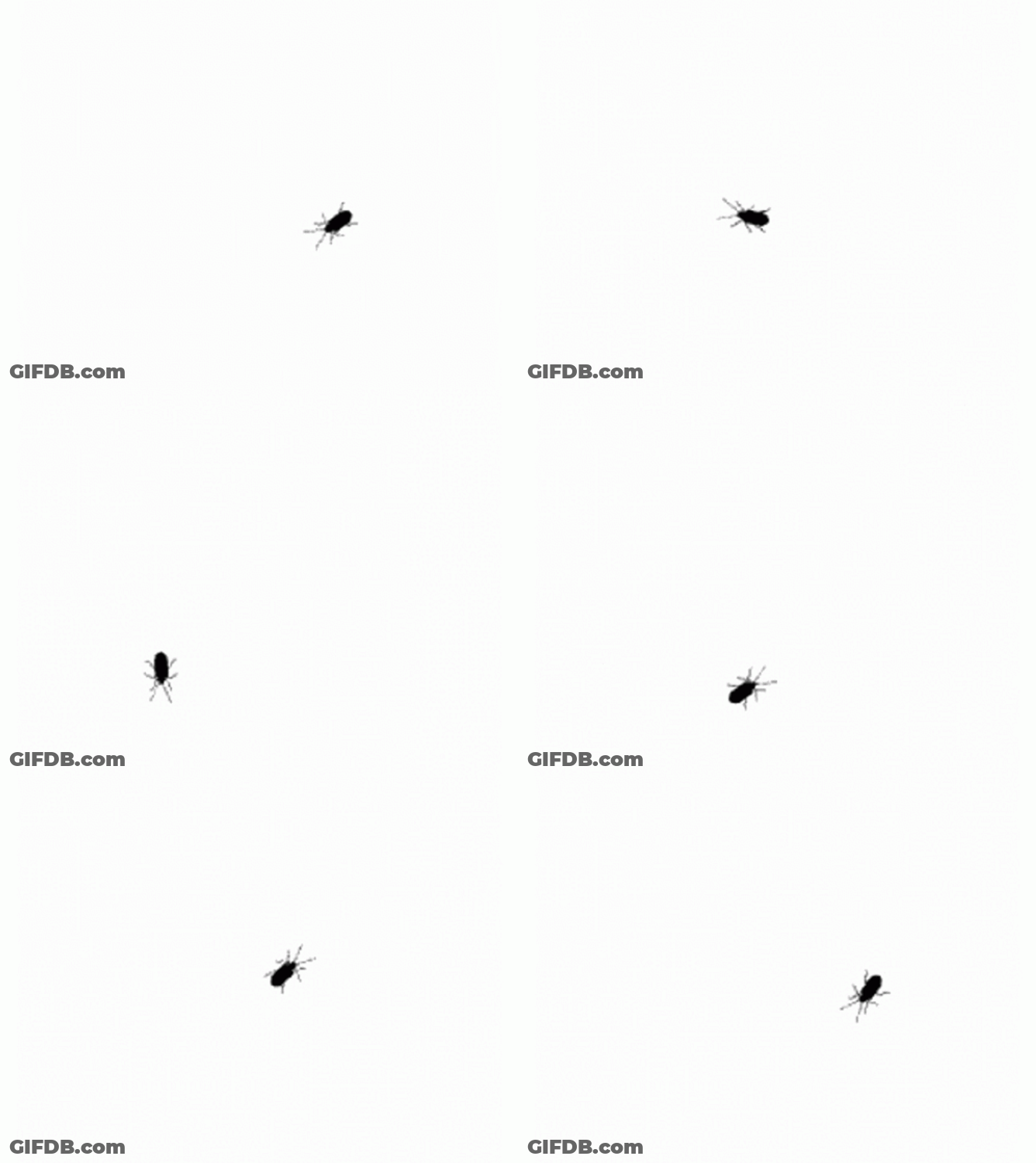
The search results were full of increasingly mangled versions, repeatedly reuploaded to services that recompressed and resized the animation as they saw fit. For example, gifdb.com slapped its watermark on it and blew it up into a 2.7 MB file. I started saving every reasonably good version I could find, planning to analyze and categorize them to see which might be closest to the original.
Once I had a small collection, I went to the folder where I keep interesting GIFs to create a subfolder for this little project... Only to discover that I already had a collection of files featuring this bug: I'd already searched for the original back in 2019. Plot twist! I'd completely forgotten. By now, 2019 felt like another lifetime.
According to my notes from back then, the previous hunt had been sparked by an avatar on the Total Commander forum, whose file turned out to be identical to the one in the freshports.org header that sparked this hunt. A funny coincidence, isn't it? Well, I never found the original back then. Maybe this time?
This version turned up fairly quickly:

Had I found it first, I might have taken it for the original and never embarked on a full-blown digital archaeology expedition. The image is fairly crisp, but has noticeably less detail than the blurry, oversized version I found earlier. There had to be something in between...
Eventually, a random collection of Halloween GIFs from 2011 on LiveJournal led me to a better version that seemed crisp enough to be the original:


All the detail was there, without excessive blurring. One thing bothered me, though: some mysterious animated asterisks in the corner, which I hadn't seen in any other version. Just to be sure, I kept looking.
By then, I'd been searching for a couple of hours. Finding a better version roughly every half hour kept me hooked. The feeling that the original was just around the corner, waiting to be found, drew me deeper and deeper down the rabbit hole.
Just as I was running out of patience and about to give up, I came across this file. At first glance, the image looked just as good as the previous one, but the canvas had been cropped to the minimum necessary size, and those mysterious animated asterisks in the corner were gone.

When I zoomed in to inspect the pixels, I got a huge rush: every pixel lined up perfectly:

This looked like the one! What's more, it was compressed quite efficiently: just 7251 bytes. Very old-school!
Those 7251 bytes! Or is it actually 4394?

Let's use GIF Explorer to analyze it.
The little GIF that started all this measured 56×50 pixels and took up 5407 bytes: 30 frames; a frame delay of 50 ms, with two 1-second pauses; an 8-bit palette with 6 colors at indices 0-5 (#000000, #333333, #666666, #999999, #CCCCCC, #FFFFFF — all the grayscale colors from the classic web-safe palette of the 1990s), with white (index 5) doubling as the transparent color.

The GIF I found measures 100×120 pixels and takes up 7251 bytes: 30 frames; a frame delay of 80 ms, with no pauses; the image is rotated by 90°; a 3-bit palette with 6 colors at indices 0-5 (#000000, #313131, #636363, #9C9C9C, #CECECE, #FFFFFF — strangely, it's almost a web-safe palette, but the colors are slightly different, though not visibly so). For some reason, the transparent color is set to index 7, which is unused, leaving the background white. It looks as though the lack of transparency is a mistake.
The most interesting discovery was that the GIF itself is actually only 4394 bytes long, followed by 2857 bytes of suspicious garbage. That makes it a full 1013 bytes smaller than the little GIF we started with, despite having four times as many pixels. Not bad!
What's in those 2857 trailing bytes? aCropalypse vulnerability in the wild
Every complete GIF should end with the byte 0x3B (the Trailer byte). Suspiciously, the garbage ends with precisely that same 0x3B, which also appears at the end of the actual 4394-byte GIF. This looks very much like the result of an aCropalypse-style vulnerability, the kind that made headlines in 2023 and also affects GIF files. In other words, when saving an open file, some GIF editor had overwritten the existing data without truncating the file. If the new data was shorter than the old data, for example after cropping or optimizing the image, the tail of the original file would remain immediately after the new data, leaving the total file size unchanged.
When I read about aCropalypse in 2023, I never imagined I'd come face to face with the aftermath of a similar bug — let alone that I'd want to recover and examine the leftover data. Let's get to it!
A closer inspection revealed 13 valid Graphic Control Extension and Image Descriptor header pairs, matching frames 18–30 of the animation in the first 4394 bytes exactly. So we were looking at an unoptimized version of the same animation! The surviving frame headers indicated an 8-bit palette. Reducing the palette from 8 bits to 3 had shrunk the GIF data from 7251 to 4394 bytes, but a bug in the saving code had left the file untruncated at 7251 bytes, preserving the last 2857 bytes of the unoptimized version.
I was eager to recover those surviving frames and see whether they contained any noticeable differences. After some tinkering with ChatGPT, I generated a suitable 4394-byte prefix containing the headers required for a GIF file, a hypothetical 8-bit palette, a blank 100×120 canvas, and a comment block as padding to steer the decoder straight to the first surviving frame header. Appending our 2857 bytes of leftover garbage to this prefix gives us a working GIF file that we can decode and examine. This let me decode all the surviving frames:

It turned out that despite the 8-bit palette, the image data used only indices 0, 43, 86, 129, 172 and 215, plus 215 as the Background Color Index and 216 as the Transparent Color Index. So even the unoptimized image actually used just 6 colors!
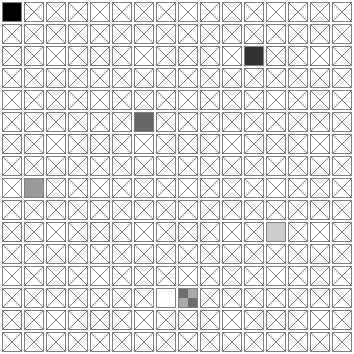
The indices in the unoptimized version clearly weren't arbitrary. This was the classic palette of 216 web-safe colors (6×6×6, also known as the Netscape Color Cube, popular in the early days of the web in the 1990s). It contained exactly 6 grayscale colors (#000000, #333333, #666666, #999999, #CCCCCC, #FFFFFF), usually at precisely the indices we saw in the decoded data (0, 43, 86, 129, 172, and 215).
The recovered tail of the unoptimized version thus confirms that the palette was web-safe from the start. Why the shades of gray in the optimized image had shifted slightly, imperceptibly to the eye, from the standard web-safe values remains a mystery. Perhaps the optimizer not only saved files incorrectly but also altered their colors a little. There was no need to do that: GIF palette entries are stored uncompressed, so their values have no effect on the final file size.
Patching the GIF in a hex editor — the real 4394 bytes
Take the file we found, cut off the leftover tail, and we get a tiny file of just 4394 bytes. Not bad!

But it still lacks transparency. Of course, any GIF editor could fix that annoying flaw. But saving would recompress the original image, and where's the fun in that? Can we avoid it? Sure: just patch a few bytes in the original file with a hex editor. Now that's more fun! For this, we'll need an explanation of the GIF format's internals and some details on transparency and animation.
First, let's restore the standard web-safe colors. The palette is the easiest part to patch: it's uncompressed and right there in plain sight. Just replace #313131, #636363, #9C9C9C, #CECECE with the standard #333333, #666666, #999999, #CCCCCC — and we're done!

0000 | 47 49 46 38 39 61 64 00 | GIF89a·· | 47 49 46 38 39 61 64 00 | GIF89a·· |
0008 | 78 00 A2 06 00 00 00 00 | ········ | 78 00 A2 06 00 00 00 00 | ········ |
0010 | 31 31 31 63 63 63 9C 9C | ········ | 33 33 33 66 66 66 99 99 | ········ |
0018 | 9C CE CE CE FF FF FF FF | ········ | 99 CC CC CC FF FF FF FF | ········ |
0020 | FF FF FF FF FF 21 FF 0B | ········ | FF FF FF FF FF 21 FF 0B | ········ |
0028 | 4E 45 54 53 43 41 50 45 | NETSCAPE | 4E 45 54 53 43 41 50 45 | NETSCAPE |
0030 | 32 2E 30 03 01 00 00 00 | 2.0····· | 32 2E 30 03 01 00 00 00 | 2.0····· |
0038 | 21 F9 04 05 08 00 07 00 | ········ | 21 F9 04 05 08 00 07 00 | ········ |
What about transparency?

All we need to do is change the incorrect Background Color Index in the GIF's Logical Screen Descriptor from 6 to 5, the index actually used for the background. Then, in the Graphic Control Extension of each of the 30 frames, change the Transparent Color Index from 7 to 5 (to make the background color transparent) and the Disposal Method from 1 (none) to 2 (background, so the previous frame is properly cleared using the background color).

The Disposal Method occupies part of the Packed Field byte, alongside other flags. In the original image, each frame has the Transparent flag set and Disposal Method = 1. That gives us 0b00000101=0x05 as shown in the diagram above. With Disposal Method = 2, we get 0b00001001=0x09. Update these values in the headers, and voilà: a patched version with working transparency!

0000 | 47 49 46 38 39 61 64 00 | GIF89a·· | 47 49 46 38 39 61 64 00 | GIF89a·· |
0008 | 78 00 A2 06 00 00 00 00 | ········ | 78 00 A2 05 00 00 00 00 | ········ |
0010 | 33 33 33 66 66 66 99 99 | ········ | 33 33 33 66 66 66 99 99 | ········ |
0018 | 99 CC CC CC FF FF FF FF | ········ | 99 CC CC CC FF FF FF FF | ········ |
0020 | FF FF FF FF FF 21 FF 0B | ········ | FF FF FF FF FF 21 FF 0B | ········ |
0028 | 4E 45 54 53 43 41 50 45 | NETSCAPE | 4E 45 54 53 43 41 50 45 | NETSCAPE |
0030 | 32 2E 30 03 01 00 00 00 | 2.0····· | 32 2E 30 03 01 00 00 00 | 2.0····· |
0038 | 21 F9 04 05 08 00 07 00 | ········ | 21 F9 04 09 08 00 05 00 | ········ |
                                         ···
0138 | 04 05 08 00 07 00 2C 30 | ········ | 04 09 08 00 05 00 2C 30 | ········ |
                                         ···
01D0 | 05 08 00 07 00 2C 2F 00 | ········ | 09 08 00 05 00 2C 2F 00 | ········ |
                                         ···
Great! Can we fix the timing too? The movement in the first little GIF looks more interesting with those pauses.
Of course! This is controlled by the Delay Time in each frame's Graphic Control Extension, specified in units of 10 ms. The first little GIF has 50 ms delays, with 1-second pauses on frames 10 and 20. The GIF we found has 80 ms delays throughout. We can change all the delays from 80 ms to 50 ms by replacing 0x08 with 0x05 in the corresponding byte of each Graphic Control Extension. The result is a slightly faster, smoother animation.

0000 | 47 49 46 38 39 61 64 00 | GIF89a·· | 47 49 46 38 39 61 64 00 | GIF89a·· |
0008 | 78 00 A2 05 00 00 00 00 | ········ | 78 00 A2 05 00 00 00 00 | ········ |
0010 | 33 33 33 66 66 66 99 99 | ········ | 33 33 33 66 66 66 99 99 | ········ |
0018 | 99 CC CC CC FF FF FF FF | ········ | 99 CC CC CC FF FF FF FF | ········ |
0020 | FF FF FF FF FF 21 FF 0B | ········ | FF FF FF FF FF 21 FF 0B | ········ |
0028 | 4E 45 54 53 43 41 50 45 | NETSCAPE | 4E 45 54 53 43 41 50 45 | NETSCAPE |
0030 | 32 2E 30 03 01 00 00 00 | 2.0····· | 32 2E 30 03 01 00 00 00 | 2.0····· |
0038 | 21 F9 04 09 08 00 05 00 | ········ | 21 F9 04 09 05 00 05 00 | ········ |
                                         ···
0138 | 04 09 08 00 05 00 2C 30 | ········ | 04 09 05 00 05 00 2C 30 | ········ |
                                         ···
01D0 | 09 08 00 05 00 2C 2F 00 | ········ | 09 05 00 05 00 2C 2F 00 | ········ |
                                         ···
Now add the 1-second pauses on frames 10 and 20 by changing their 0x05 to 100=0x64, and we have exactly what we wanted!

We can't rotate the GIF this way, though. That would require rebuilding and recompressing every frame. Still, patching the bugs in the original GIF was pretty fun :)
6 colors, 30 frames, and not a byte to spare
4394 bytes is good, but can we make it even smaller? We can! Let's optimize the patched GIF losslessly with gifsicle and flexigif, and rotate it by 90° to match the version that started all this, using this Windows batch script:
gifsicle --rotate-90 -O3 --no-comments --no-names original_patched_with_stops.gif ^
    --use-exact-colormap=original_patched_with_stops.gif -o rotated_optimized_gifsicle.gif ^
    && flexigif -f -p rotated_optimized_gifsicle.gif rotated_optimized.gif ^
    && del rotated_optimized_gifsicle.gif
Alternatively, we could have skipped all the fun of manual patching and obtained an identical result from the unpatched file with this batch script:
@> "colormap.txt" (
    @echo #000000
    @echo #333333
    @echo #666666
    @echo #999999
    @echo #CCCCCC
    @echo #FFFFFF
    @echo #FFFFFF
    @echo #FFFFFF
)

gifsicle --unoptimize --transparent="#FFFFFF" --disposal=background --rotate-90 --no-comments --no-names original.gif ^
    --delay=5 "#0-8" --delay=100 "#9" --delay=5 "#10-18" --delay=100 "#19" --delay=5 "#20-29" --optimize=3 ^
    --use-exact-colormap=colormap.txt -o rotated_optimized_gifsicle.gif ^
    && flexigif -f -p rotated_optimized_gifsicle.gif rotated_optimized.gif ^
    && del rotated_optimized_gifsicle.gif ^
    && del colormap.txt
The resulting optimized GIF file is just 3896 bytes:
Compare that with the little version we started with, which took up 5407 bytes (shown at 200%):
Improving Gifsicle
Along the way, I ran into a couple of issues with Gifsicle and FlexiGIF. Fixing and working around them became another side quest:
- Gifsicle did not preserve the palette specified with --use-exact-colormap when --optimize=3 optimization was enabled.
- Gifsicle would occasionally produce a slightly malformed file with a truncated EOI (end-of-image) code. Browsers tolerate this error, which is why it went unnoticed for years, but it violates the specification, and FlexiGIF refuses to read such files.
I submitted my fixes to the author of Gifsicle, but he chose to address the issues his own way and completely rewrote the proposed code. The batch scripts above require Gifsicle v1.98 or later.
Since Gifsicle's author doesn't provide a prebuilt Windows binary, I've compiled one for you: gifsicle.7z.
APNG and WebP with an alpha channel
The bug itself is solid black; all the shades of gray occur only along its edges, as a result of antialiasing. These shades effectively represent different levels of transparency, flattened onto a white background due to GIF's limitations. The natural next step is to create an APNG with a full alpha channel.
Let's use ffmpeg for conversion, and apngopt together with oxipng for optimization:
ffmpeg -i rotated_optimized.gif -vf "format=rgba,geq=r=0:g=0:b=0:a='alpha(X,Y)*(255-r(X,Y))/255'" ^
    -plays 0 -f apng rotated_optimized_ffmpeg.png ^
    && apngopt -z2 -i100 rotated_optimized_ffmpeg.png rotated_optimized.png ^
    && oxipng -o 6 -z --strip safe --alpha rotated_optimized.png ^
    && del rotated_optimized_ffmpeg.png
This gives us an optimized APNG with a clean alpha channel:
Even after optimization with several tools, the APNG took up 5158 bytes. Good old GIF did much better at 3896 bytes.
For a more complete comparison, I also converted the animation to an optimized lossless WebP (using img2webp.exe -lossless -q 100 -m 6 -min_size), which came out at 4546 bytes. Well, what do you know? GIF beat that too!

Here's how the optimized versions compare across formats:
| 6-color GIF | 3896 bytes |
| 6-color APNG | 5158 bytes |
| 6-color WebP | 4546 bytes |
I hadn't planned to turn this into a format race, but I'm honestly surprised that old GIF beat them all. After all, every file here contains the same amount of image information, and representing the transparency levels in a 6-color palette takes just 6 extra bytes.
When did the original GIF appear? A lead from China
Before publishing the article, I wanted to round out the story by pinning down when this GIF might have first appeared. So I went looking for evidence of its earliest use.
Finding early examples proved difficult. The Wayback Machine showed that the avatar on the Total Commander forum was already there in December 2013, while the same file, with the ironic name notbug.gif, had been available on freshports.org since at least January 2012 (the archive capture date is visible in the URL). Not particularly impressive, given that even the version with animated asterisks had appeared in a collection of Halloween GIFs from 2011. But examining the original HTTP headers of the archived notbug.gif pushed the earliest known date back to March 2011:


C:\Users\VEG>curl -sI "https://web.archive.org/web/20120125155043im_/http://www.freshports.org/images/notbug.gif"
HTTP/1.1 200 OK
Content-Type: image/gif
Content-Length: 5407
x-archive-orig-date: Wed, 25 Jan 2012 15:50:43 GMT
x-archive-orig-server: Apache/2.2.20 (FreeBSD) mod_ssl/2.2.20 OpenSSL/0.9.8q DAV/2 PHP/5.3.9
x-archive-orig-last-modified: Mon, 07 Mar 2011 00:49:06 GMT
Several websites (mostly Russian-language ones) had an interesting derivative featuring “dancing” bugs:

Every bug follows exactly the same path as in the original. The source animation has been mirrored and duplicated in a kaleidoscope-like pattern, producing a funny dance effect.
A reverse image search found the earliest evidence of this version being used in January 2010. But the most interesting part was inside the file: unexpectedly, it contained a comment in Chinese (encoded in GB2312):
★贪婪大陆☆我的过去好像梦〖XG】
看似浮云收放不能,看似凡人默默耕耘...
ChatGPT translated it roughly as:
★ Greedy Continent ☆ My past feels like a dream [XG]
Like drifting clouds, impossible to hold;
like an ordinary person, quietly toiling away...
I have no idea what any of that means, but I'm intrigued. Apparently, we're speaking poetry now. ChatGPT suggested that “Greedy Continent” referred to the Chinese anime website greedland.net and its forum with a mirror, which were popular in the 2000s before the site shut down in 2011. Perhaps this version of the animation was first posted there, and “[XG]” refers to its creator.
A clue! Exploring the Chinese web. An unexpected find
Since the latest find pointed to a Chinese website, I armed myself with a translator and started searching the Chinese web through Baidu. It was one place I hadn't checked yet.
Almost immediately, I came across some creative variations featuring a whole swarm of bugs:

There were also several other derivatives with lots of bugs, some less successful and poorly looped. All were assembled from the original single-bug GIF: every bug follows the same path.


But these were all fairly recent examples, and I was still looking for evidence of the earliest use. Then, on some Chinese website, I found this... The file hadn't been in the Wayback Machine before, but the website itself listed its upload date as 26 April 2009, making it the earliest example I'd found so far.

What's more, the animation was at its original resolution, but with some inexplicable extra padding on the right (160×120 instead of 100×120). Imagine my surprise when I discovered that this file was exactly 7251 bytes long, just like the file we'd been calling the original.
Wait, what?! Is this the unoptimized original?
A byte-by-byte comparison revealed that this was the very same unoptimized original whose tail I'd worked so hard to recover. All 2857 trailing bytes matched exactly!
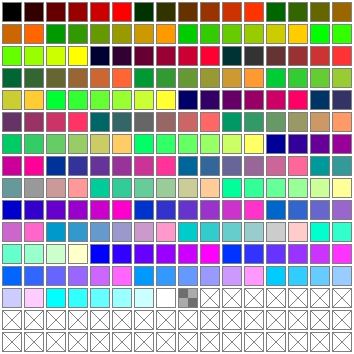
The newly discovered GIF did indeed use the 216-color web-safe palette (in red-fastest order), and its grays were unaltered, just as expected. The person who optimized it hadn't changed the bug's coordinates, since cropping the padding on the right had no effect on the image itself. Why was that padding there in the first place? No idea.
In any case, we now had the actual unoptimized original. Crop the empty area on the right to bring it down to 100×120, rotate it by 90°, and optimize it using the same lossless process we applied to our “first original” with its manually restored web-safe palette, and the result is byte-for-byte identical.

@> "colormap.txt" (
    @echo #000000
    @echo #333333
    @echo #666666
    @echo #999999
    @echo #CCCCCC
    @echo #FFFFFF
    @echo #FFFFFF
    @echo #FFFFFF
)

gifsicle --unoptimize --transparent="#FFFFFF" --disposal=background --loopcount=forever ^
    --crop=0,0-100,120 --rotate-90 --no-comments --no-names original_unoptimized.gif ^
    --delay=5 "#0-8" --delay=100 "#9" --delay=5 "#10-18" --delay=100 "#19" --delay=5 "#20-29" --optimize=3 ^
    --use-exact-colormap=colormap.txt -o rotated_optimized_gifsicle.gif ^
    && flexigif -f -p rotated_optimized_gifsicle.gif rotated_optimized.gif ^
    && del rotated_optimized_gifsicle.gif ^
    && del colormap.txt
In other words, the two versions of the original contain the same pixel data: only 6 colors are actually used, and the differences come down to optimization, canvas size, and a slightly altered palette. Even without the actual original file, we'd managed to produce the same result, byte for byte.
Since we found two versions of the original online, one with an 8-bit web-safe palette and one with an optimized 3-bit palette, we can tentatively assume they were made at different times by different people. Whoever tried optimizing it apparently failed to notice that the “optimized” file was exactly the same size, and uploaded it anyway. Funny.
Here we go again... The 72-color original... of the 6-color original?!
So, we'd made it back to 2009. Memory can be unreliable, of course, but I had a feeling I'd seen it earlier. I decided to go digging “one last time” again.
Following one link after another, I suddenly stumbled across this file (part of the cangying plugin from 2021 for the Chinese blogging platform Z-BlogPHP, which simply displays the GIF on web pages). At first glance, it looked like the 160×120 original we already knew. But this one had a fully transparent background and was a little larger: 7706 bytes, or 455 bytes more than our original. What was going on? I took a closer look.

Our 6-color original:
The newly found file:

It turned out that this version used 72 shades of gray. I'd examined a huge number of derivatives of this GIF, and in all of them, the main colors were the grays from the web-safe palette. The color usage statistics for this 72-color version were no exception: more than half the opaque pixels used those same 6 web-safe grays, with all the others being intermediate shades derived from them in fractions ranging from 1/4 to 1/64. That couldn't be a coincidence. One explanation would be that this was a lightly processed version of our 6-color original. But a close inspection of every frame made that seem unlikely: it didn't look like the result of distorting the source image. It looked more like the original behind our original, before conversion to a web-safe palette with 6 shades of gray.
The 72-color version can be converted to 6 colors using the following mapping, based on each pixel's brightness from 0 to 255:
  0..47  -> #000000
 48..90  -> #333333
 91..151 -> #666666
152..197 -> #999999
198..223 -> #CCCCCC
224..255 -> #FFFFFF
After this conversion, only 36 of the 5112 opaque pixels differ from our 6-color original. That supports the hypothesis that the 6-color version was derived from the 72-color one. As for those 36 mismatched pixels, the most likely explanation is that they looked a little out of place after automatic conversion and were touched up by hand to improve the image.
But why, then, are the same 6 shades of gray the core colors of the 72-color version? A possible explanation is that the static image of the bug used to create the very first animation was itself drawn in those 6 web-safe grays, and the intermediate shades appeared when that image was rotated to arbitrary angles.
Optimizing the 72-color version and adding an alpha channel
Since web-safe grays keep turning up everywhere in this animation's history, I still consider the 6-color version the best choice for a definitive version. But having compared the optimized 6-color GIF against APNG and WebP with alpha channels, how would these formats fare with the 72-color version? I used the same optimization tools as for the 6-color version, only without a fixed colormap this time. Here are the results, alongside the 6-color version for comparison:
| 72-color GIF | 6610 bytes | 6-color GIF | 3896 bytes |
| 72-color APNG | 7528 bytes | 6-color APNG | 5158 bytes |
| 72-color WebP | 7024 bytes | 6-color WebP | 4546 bytes |



GIF wins again, though by a smaller margin this time. APNG trails furthest behind because it has a fairly large header for each frame. With 30 frames in this animation, each tiny in its own right, that overhead adds up.
To be honest, I was rooting for APNG in this format race, but it came last :( Years ago, Max Stepin, the author of apngasm, and I actively pushed for APNG support in Chromium, and therefore all Chromium-based browsers, until Google finally agreed.
So, how old is this GIF?
The original 72-color file contains an interesting comment in Chinese (encoded in GB2312):

试用版: 使用未注册版本的 GIF Movie Gear 4.0 制作 gamani 出品(http://www.gamani.com)
It means the following (the trial version of GIF Movie Gear added a comment like this to every file it created):
DEMO VERSION : Built with an UNREGISTERED copy of GIF Movie Gear 4.0 from gamani productions (http://www.gamani.com).
Now that gives us an interesting clue to the possible timeframe. According to the official GIF Movie Gear website, version 4.0 was released in 2004. Later versions, including the most recent ones, still mention 4.0 in this comment, so at least this tells us the earliest possible date for the file.
When most of the research for this article was done and the draft was nearly finished, I happened to spot a downscaled version of the original GIF being used as an avatar on RuTracker. Requesting the file returns HTTP headers indicating an upload date of 30 May 2008:
C:\Users\VEG>curl -sI "https://static.rutracker.cc/avatars/0/29/3748729.gif"
HTTP/1.1 200 OK
Content-Type: image/gif
Content-Length: 3994
Last-Modified: Fri, 30 May 2008 11:02:22 GMT
You'd think that would be enough... But one lead remained largely unexplored: the possible connection to the defunct Chinese forum greedland.net. I downloaded every GIF from that site preserved in the Wayback Machine. Unfortunately, among several thousand files, I found only one avatar, and it was identical to the one we'd just seen on RuTracker. The archive captured it in 2010, but preserved the original headers, which indicated that the file had been uploaded on 6 May 2008:
C:\Users\VEG>curl -sI "https://web.archive.org/web/20100615233815if_/http://bbs2.greedland.net/avatars/00/38/66/25/1.gif"
HTTP/1.1 200 OK
Content-Type: image/gif
Content-Length: 3994
x-archive-orig-date: Tue, 15 Jun 2010 23:35:57 GMT
x-archive-orig-server: Apache
x-archive-orig-last-modified: Tue, 06 May 2008 08:50:49 GMT
Finally, on the wonderful old-GIF search engine GifCities, I found numerous examples captured and preserved by the Wayback Machine in 2009, when the popular personal website hosting service GeoCities announced its impending closure. The earliest example was captured in July 2009, and its original headers were particularly interesting: they indicated that the file had been uploaded on 23 April 2007:

C:\Users\VEG>curl -sI "https://web.archive.org/web/20090727234125im_/http://www.geocities.com/gr8fuldaniel/BUG.gif"
HTTP/1.1 200 OK
Content-Type: image/gif
Content-Length: 2666
x-archive-orig-date: Mon, 27 Jul 2009 23:41:25 GMT
x-archive-orig-last-modified: Mon, 23 Apr 2007 19:52:57 GMT
So it looks like our little bug came from China, sometime between 2004 and 2007.
Incidentally, the version we started with, featuring two 1-second pauses and 50 ms frame delays, seems to be a slightly later variation from around 2011. There are plenty of examples from 2007–2009 on GeoCities, and every one is either the original with 80 ms frame delays and no pauses, or an early variation with three pauses and 80 ms delays.
Who made it? Where was it first published?
¯\_(ツ)_/¯
I'm afraid that it will have to remain a mystery. This rabbit hole proved too deep. I've already spent an unreasonable amount of time on the investigation. I think I'll leave it here.
TL;DR
- I found an optimized 6-color version of the original GIF with an unusual tail of 2857 bytes left over from an earlier unoptimized version, due to an aCropalypse-style vulnerability in the optimization software. I partially recovered the leftover data and later found the unoptimized 6-color original.
- I found a 72-color version that appears to predate the 6-color one. After converting its palette to 6 colors, only 36 of the 5112 opaque pixels differ.
- As an experiment in fixing GIF errors without recompression, I manually patched the original optimized 6-color version in a hex editor to restore transparency (present in the 72-color version) and the original web-safe grays in the palette (that were slightly distorted during optimization).
- Using the original, I created a fully optimized GIF with the same orientation and timing as the little GIF in the freshports.org header that started this hunt. I also created versions with a full alpha channel in APNG and WebP. After lossless optimization, the 6-color GIF is just 3896 bytes, and the 72-color GIF is 6610 bytes. In both cases, GIF was much smaller than APNG and WebP.
- The historical evidence suggests that the GIF originated in China sometime between 2004 and 2007.
Comments are temporarily closed. Refresh this page in a minute.